EMG classification (CatBoost)
End-to-end walkthrough of examples/synthetic/emg_classification.py: synthetic 8-channel EMG → RMS+MAV features (from myogestic.recipes.features) → CatBoost binary classifier → smoothed hand pose → VHI.
Code below is included from the example
The Python blocks in this walkthrough are pulled verbatim from the example file via snippet includes, so they can't drift from the runnable script.
End to end, zero classes besides the framework's App and Pipeline.
Run it first
One terminal, then click Launch in the GUI's ProcessLauncher panel to spawn the synthetic EMG generator.
VHI is optional for this demo - the predicted hand pose is pushed over an LSL outlet whether or not VHI is listening. To see the 3D hand, install it once with python -m myogestic.tools.install_vhi (see Install the Virtual Hand) and run it alongside.
What you should see
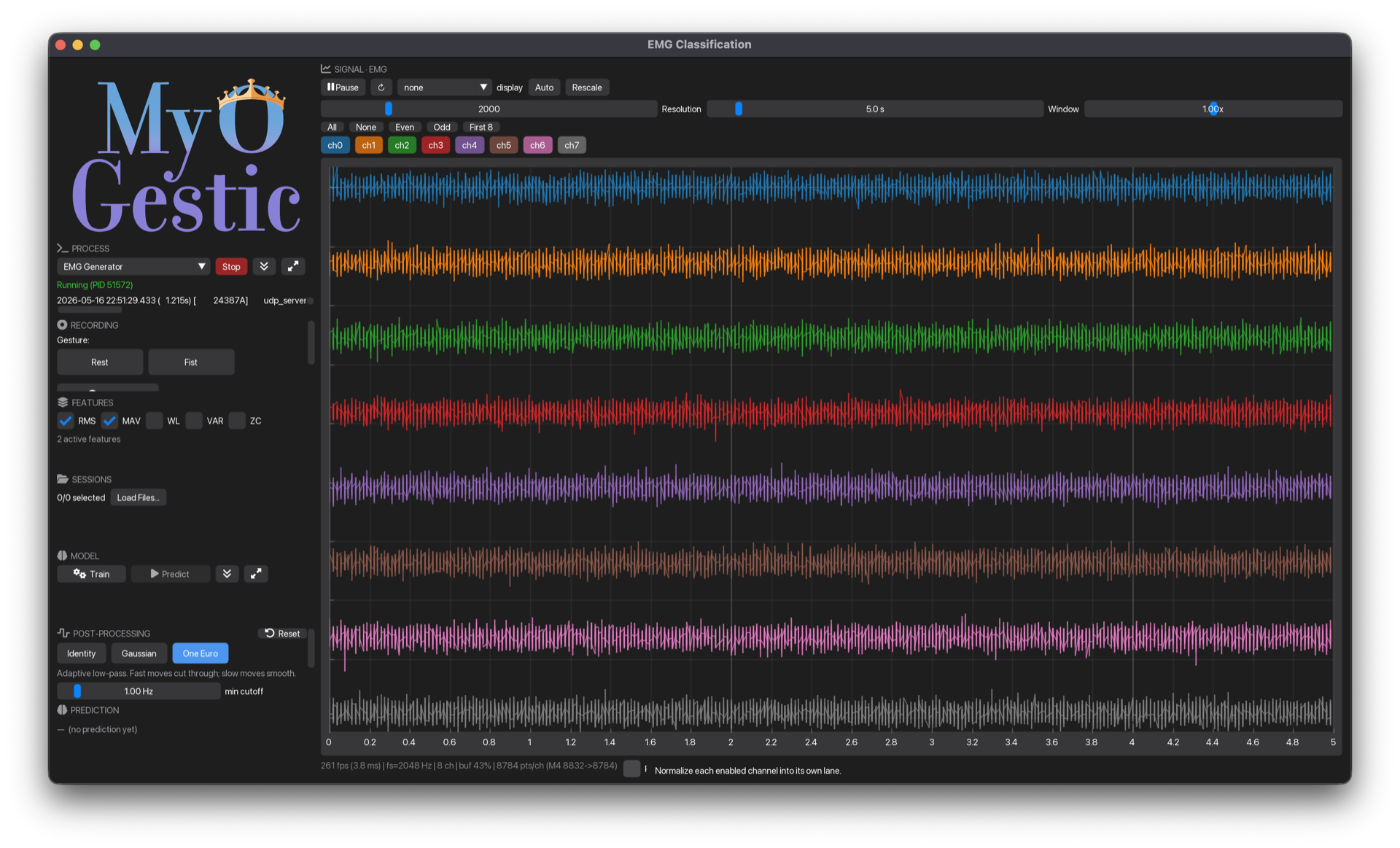
A 3-column window:
- Right two columns: live EMG signal viewer.
- Left column, top to bottom: logo, EMG-generator launcher, recording controls, feature selector, session manager, pipeline panel, output-filter panel, prediction label.
Click Launch on EMG Generator → synthetic 8-channel signal flows. If you started VHI separately, the predicted pose drives its 3D hand.
The walkthrough
The whole script is structured top-to-bottom: imports → outputs → constants → app setup → callbacks → layout → app.run(). Read it in that order.
1. Outputs and side-channels
control_outlet() is the one-liner over the boilerplate StreamOutlet(StreamInfo(name="EMG_Control", stype="Control", n_channels=1, ...)) - see myogestic.tools.emg_generator.control_outlet. The synthetic generator listens on EMG_Control for which class pattern to emit. Click "Fist" in the button strip → ctrl_outlet.push_sample([1.0]) → generator switches to pattern 1.
vhi = virtual_hand()

# The left side is ours, the right side is VHI's. Parsing needs no VHI; resolving does.
CONTROL_FILE = pathlib.Path(__file__).resolve().parent.parent / "controls" / "classification.toml"
with CONTROL_FILE.open("rb") as handle:  # "rb" — tomllib requires binary
    CONTROL_MAP = load_control_map(tomllib.load(handle))

# Both aliases declare a `threshold_fraction` in the file, so a probability is gated to
# 0 or 1 there and reaches the hand as an ordinary control value — same path as regression.
FIST_ALIASES = ("fist", "thumb_spread")
The example declares its own outputs in examples/controls/classification.toml. Both entries carry a threshold_fraction, which says their input is a classifier probability rather than a position: below the fraction the value becomes 0, at or above it 1. There are no pose vectors here — fist fans out to all five digits and thumb_spread abducts the thumb, so a whole-hand pose is two numbers and the target decides what each one drives.
2. The output filter
PostProcessor is the post-processing widget - exposes a UI panel and is callable. We hand it to the bus as ControlBus(..., smoothing=output_filter) so it runs once per frame before any target sees it, and render its panel inside @app.ui.
See Post-process predictions for tuning.
3. Feature set
features = FeatureSelector(
    {"RMS": rms, "MAV": mav, "WL": wl, "VAR": var, "ZC": zc},
    default=["RMS", "MAV"],
)
FeatureSelector holds a menu of named feature functions - the reference rms/mav/wl/var/zc from myogestic.recipes.features, plus any of your own callables - and renders a panel to toggle them live. Calling it, features(window), runs every active feature over the channels-first window and stacks the results into one flat vector. default=["RMS", "MAV"] ticks two on at startup.
4. App, stream, pipeline
WINDOW_MS = 200
HOP_MS = 100

app = App("EMG Classification", ui_scale=0.85)
app.streams(Stream("emg", source=LSLSource("TestEMG1"), window_ms=WINDOW_MS, buffer_ms=60000))
pipeline = Pipeline(app)
The stream window is 0.2 s - every extract() call sees the most-recent 0.2 s of EMG, channels-first as (n_channels, n_samples). The buffer is 60 s so SignalViewer shows a longer history than the prediction window.
5. extract - same code for training and live predict
@pipeline.extract
def extract(windows: dict[str, np.ndarray]) -> np.ndarray:
    """Active features stacked along axis 0 → flat feature vector."""
    return features(windows["emg"])
features(windows["emg"]) runs every active feature over the window (channels-first (n_channels, n_samples)) and returns one flat vector. The same function is invoked from inside train() (over recorded windows) and on the predict thread (over live windows), so training and inference always see identical features.
6. train - slice sessions, featurize, fit
@pipeline.train
def train(data: TrainingData):
    """Train a CatBoost classifier on numpy features from selected sessions.

    Every feature here reduces a window to one scalar per channel, so the feature
    dimension is ``n_active_features * n_channels``.
    """
    if data.is_empty:
        raise ValueError("No sessions selected. Load some and tick the checkboxes.")
    if len(data.classes) < 2:
        active = sorted(data.classes)
        names = [CLASSES[i] if 0 <= i < len(CLASSES) else f"c{i}" for i in active]
        raise ValueError(
            f"Classification needs ≥2 active classes — got {len(active)} ({names}). "
            f"Toggle more class chips on."
        )
    if features.n_active == 0:
        raise ValueError(
            "No features ticked in the FEATURES panel. Tick at least one "
            "(RMS+MAV is the default combo)."
        )
    print(f"[train] features: {features.active_names}")

    all_X: list[np.ndarray] = []
    all_y: list[int] = []

    for window, _ts, class_idx in iter_labeled_windows(
        data.paths, "emg", WINDOW_MS, HOP_MS, classes=data.classes
    ):
        all_X.append(extract({"emg": window}))
        all_y.append(class_idx)

    print(
        f"[train] {len(all_X)} windows from {len(data.paths)} sessions, "
        f"classes={sorted(data.classes)}"
    )
    if len(all_X) < 2:
        raise ValueError(f"Need at least 2 windows, got {len(all_X)}")

    X = np.stack(all_X)
    y = np.array(all_y)

    if len(np.unique(y)) < 2:
        raise ValueError(f"Need at least 2 classes, got {len(np.unique(y))}")

    clf = catboost_classifier(iterations=100)
    clf.fit(X, y)
    print(f"[train] done — accuracy on train: {clf.score(X, y):.2%}")
    return clf
iter_labeled_windows does all the session-loading, label-track walking, and overlapping-window slicing - see Record and replay. We just call extract() on each window.
The validation up front (is_empty, len(data.classes) < 2) gives the user actionable error messages - the framework's design principle "errors tell you what to write." If you forget to tick a session in SessionManager, you'll see "No sessions selected. Load some and tick the checkboxes." in the status panel.
7. predict - classify, gate to an activation, smooth, push
@pipeline.predict
def predict(model, features):
    """Classify → gate to an activation → smooth → push to VHI.

    The probabilities themselves flow through untouched, for the UI.
    """
    proba = model.predict_proba(features.reshape(1, -1))[0]
    class_idx = int(np.argmax(proba))
    # `link.bus`, never `link.ensure()`: binding blocks on an RPC and this callback has a
    # deadline.
    if link.bus is None:
        return {"class": class_idx, "proba": proba}
    # Pushed raw: the bus gates it, so VHI is never handed a bare 0.73 as a finger position.
    activation = float(proba[CLASSES.index("Fist")])
    hand = link.bus.push(dict.fromkeys(FIST_ALIASES, activation))
    return {"class": class_idx, "proba": proba, "hand": hand}
There is no pose lookup. predict pushes the probability of "Fist" and the bus gates it, so three separate decisions happen in a fixed order: threshold_fraction decides whether the hand is closed (0 or 1), the fan-out weights decide how much of that each digit gets, and the filter decides how fast the change is allowed to look. VHI receives continuous per-control values — the same ones a regressor would send — so a classifier and a regressor reach the hand the same way. The dict return goes to pipeline.predictions for any widgets that want to display class probabilities.
Why filter the activation, not the class index?
OneEuro expects a continuous vector. Class indices are integers, so smoothing them is meaningless. Smoothing the gated activation lets the hand fade open and shut cleanly even when the classifier flips on the boundary — and because the gate runs first, the filter only ever ramps between 0 and 1, never through some intermediate confidence the model never asserted.
8. Layout
LOGO_CELL_W = 300
WORDMARK_ASPECT = 800 / 540
grid = Grid(
    8,
    3,
    row_height=[Px(LOGO_CELL_W / WORDMARK_ASPECT), *[Fr(1)] * 7],
    col_width=[Px(LOGO_CELL_W), Fr(1), Fr(1)],
)


def _on_gesture(i: int) -> None:
    link.ensure()
    ctrl_outlet.push_sample(np.array([CTRL_VALUES[i]], dtype=np.float32))  # type: ignore


def _on_record() -> None:
    link.ensure()
    app.start_recording()


viewer = SignalViewer("emg")
logo = AppLogo()
processes = ProcessLauncher(PROCESSES)
recording = RecordingControls(
    CLASSES,
    on_record=_on_record,
    on_stop=app.stop_recording,
    on_gesture=_on_gesture,
)
sessions = SessionManager("sessions", class_names=CLASSES)
panel = PipelinePanel(pipeline)
prediction = PredictionLabel(pipeline, CLASSES)


@app.ui
def demo_ui(ctx):
    with grid[0:8, 1:3]:
        viewer.ui(ctx)

    with grid[0, 0]:
        # No size cap: the widget fits-in-rect, preserving aspect, and centres itself.
        logo.ui()

    with grid[1, 0]:
        processes.ui()

    with grid[2, 0]:
        recording.ui(ctx)

    with grid[3, 0]:
        features.ui()

    with grid[4, 0]:
        pipeline.training_data = sessions.ui()

    with grid[5, 0]:
        panel.ui()

    with grid[6, 0]:
        output_filter.ui()

    with grid[7, 0]:
        prediction.ui()
An 8×3 grid: the signal viewer fills the right two columns, and the left column stacks eight widget calls top-to-bottom - logo, EMG-generator launcher, recording controls, feature selector, session manager, pipeline panel, output-filter panel, prediction label. Every panel is a plain function call. SessionManager returns a TrainingData instance - assigning it to pipeline.training_data is the only line that connects "what's ticked in the UI" to "what train() will see."
9. The actual experiment loop
In the GUI:
- Click
Launchon EMG Generator → live signal appears. - (Optional) start VHI separately → its 3D hand mirrors the predicted pose.
- Click the Rest button → generator emits the rest pattern.
- Click Record → start saving to
sessions/<timestamp>/. - Hold rest for ~3 s, click Fist, hold fist ~3 s, click Rest, hold rest ~3 s, click Fist… (cycle-style - see Record and replay).
- Click Stop.
- Repeat for a few cycles.
- Tick all sessions in session_manager.
- Click Train → console prints
[train] N windows from M sessions ... done - accuracy on train: ~99%. - Click Predict → VHI hand follows your button clicks live.
Tune the One Euro sliders in the filter panel while predicting to feel the lag/responsiveness trade-off in real time.
Variations
- More classes: bump
CLASSES,CTRL_VALUESand--classes, add an alias per output to the TOML, and push each class's probability under its own alias. Nothing inpredictneeds a branch. - Different feature set: swap RMS/MAV for whatever your domain needs. Keep
extract()'s return shape consistent across training and live. - Different model: replace
catboost_classifierwith sklearn / XGBoost / PyTorch. See Add a custom model for the patterns. - Real hardware: replace
LSLSource("TestEMG1")with a real source - see Add a custom source.