Home

Real-time biosignal experiment GUI builder. A compact Python framework that turns a short script into a live experiment - signal viewers, recording, training, prediction - without classes, registries, or config files.
from myogestic import App, Stream
from myogestic.sources import LSLSource
from myogestic.widgets import RecordingControls, SignalViewer

app = App("Hello EMG")
app.streams(Stream("emg", source=LSLSource("EMG"), window_ms=1000))

viewer = SignalViewer("emg")
recording = RecordingControls(
    ["Rest", "Fist"], on_record=app.start_recording, on_stop=app.stop_recording
)


@app.ui
def ui(ctx):
    viewer.ui(ctx)
    recording.ui(ctx)


app.run()
That's the whole loop. Add a Pipeline, decorate extract / train / predict, and you have a closed-loop experiment.
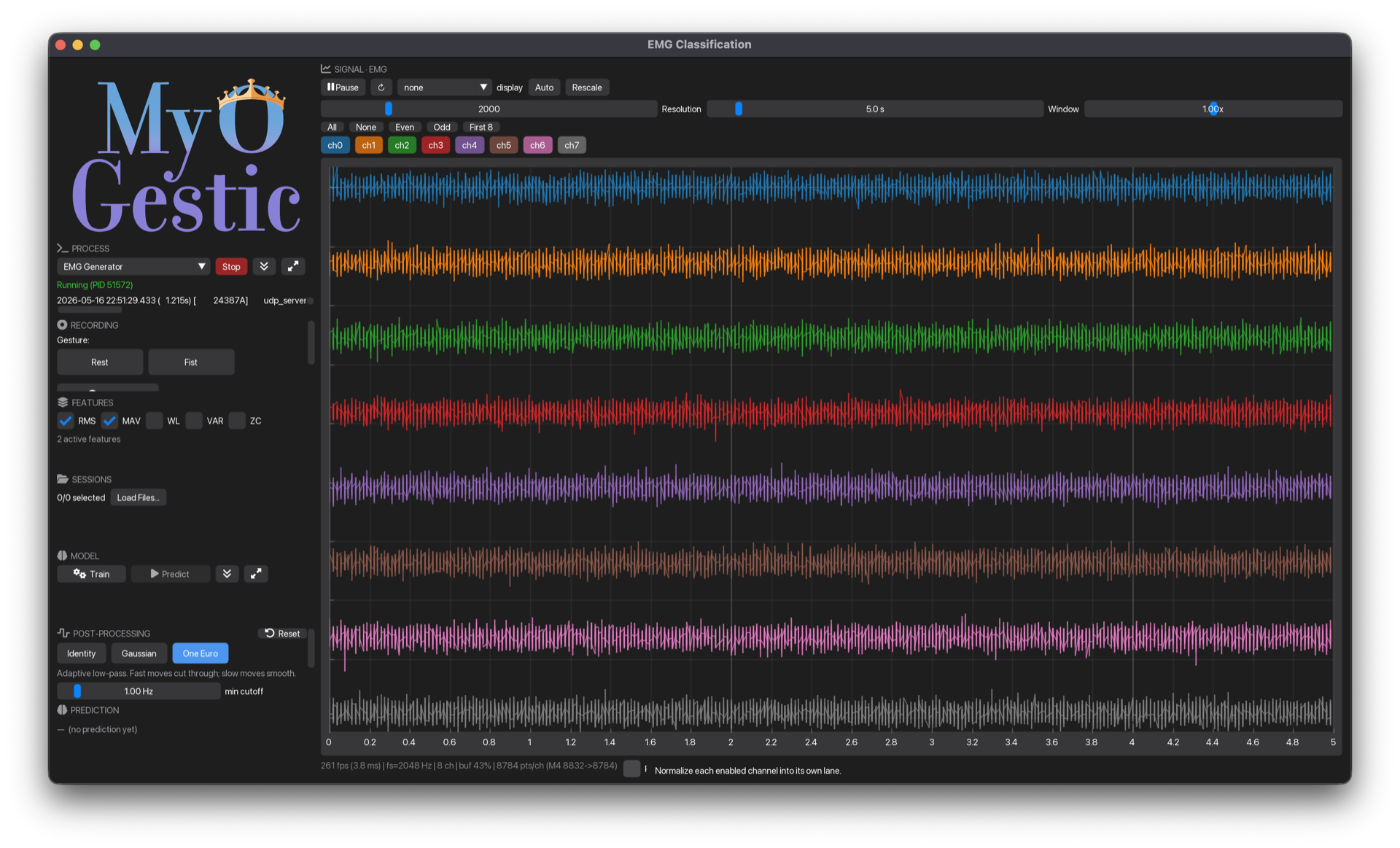
Live signal viewer (right) plus process launchers, recording controls, train/predict, output filter, and session manager (left). One script, one window.
Top-level data flow
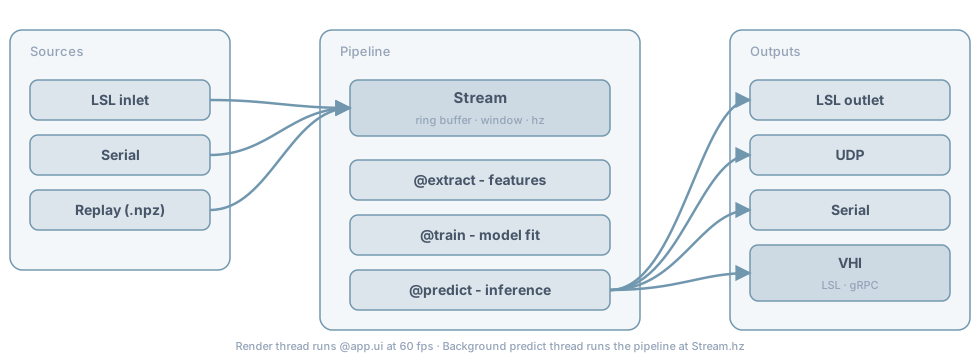
Sources push samples into a Stream ring buffer. The pipeline's @extract, @train, @predict decorators read from that buffer and produce predictions. A target turns those into movement - a prosthesis on a serial port, a motor controller, a cursor, or the Virtual Hand Interface over LSL+gRPC - and an LSLOutlet publishes them for another program to read. The render thread runs @app.ui at 60 fps independently of the predict thread; see Concepts → Threading.
Try it in your browser
A live MyoGestic app running entirely in your browser via Pyodide. Pick a gesture, record a few seconds, train an LDA, watch the prediction flip on every click. No install, no Python on your machine, just a tab.
Pyodide + imgui-bundle WASM + scikit-learn, ~30 s first-load, cached after.
Where to go next
- Getting Started - install, run the synthetic-EMG demo
- I have a device - drive your prosthesis, motors or cursor from a control map. Three methods; a copyable example that runs without hardware
- Anatomy of an app - walk through one complete script in the order you write it
- Guides - every task guide, grouped by job: start here, driving a device, recording, models, extending
- Concepts - streams, pipeline, threading, recording, design principles
- Troubleshooting - symptom-first reference for the things that go wrong
- Reference - auto-generated API + cheatsheet + glossary
Design principles
- No base classes, no inheritance, no registration, no config files.
- Public API fits on one page. Each widget is a single public function; implementation may split into private
_<widget>_*.pyhelpers when it grows. - Errors tell you what to write, not what went wrong.
- Plain functions with typed arguments and typed returns.
- Immediate-mode rendering - widgets are stateless function calls.
See Design principles for the full list.