Skip to content

ML pipeline

Pipeline

Pipeline(app: App, predict_hz: float = 50.0)

ML lifecycle + state for an App.

Constructor registers the predict thread + cleanup on the App's hook lists; they fire on app.run() start/exit. Decorators set the callbacks. Transition methods flip app.ctx.state.

Parameters:

Name Type Description Default
app App

The myogestic App.

required
predict_hz float

Maximum predict-loop tick rate. Set to 0 or negative to remove the cap (run at full speed).

50.0
Source code in myogestic/ml/__init__.py
def __init__(self, app: App, predict_hz: float = 50.0):
    """
    Args:
        app: The myogestic App.
        predict_hz: Maximum predict-loop tick rate. Set to 0 or
            negative to remove the cap (run at full speed).
    """
    self.app = app
    self.predict_hz = predict_hz
    self.model: Any = None
    self.predictions: dict[str, Any] = {}
    self.train_log: list[str] = []
    self.on_extract: Callable | None = None
    self.on_train: Callable | None = None
    self.on_predict: Callable | None = None
    # Set if you want save/load buttons to do anything; the
    # `myogestic.models.{save,load}_model` joblib helpers are the
    # obvious default but the library doesn't force them.
    self.save_model: Callable | None = None
    self.load_model: Callable | None = None
    # Set this from inside `@app.ui` to publish what the user picked
    # in `session_manager(...)` to `@pipeline.train`.
    self.training_data: TrainingData | None = None
    self._stop = threading.Event()
    self._thread: threading.Thread | None = None

    app.before_run_hooks.append(self._start_predict_thread)
    app.cleanup_hooks.append(self._cleanup)

extract

extract(fn: Callable) -> Callable

Decorator: register the feature-extraction callback.

The wrapped function receives windows: dict[str, np.ndarray] keyed by stream name — each array is channels-first (n_channels, n_samples). Return whatever shape your model wants to consume. The same function is invoked from inside train() (over recorded windows) and on the predict thread (over live windows), so keep its return type stable.

Source code in myogestic/ml/__init__.py
def extract(self, fn: Callable) -> Callable:
    """Decorator: register the feature-extraction callback.

    The wrapped function receives ``windows: dict[str, np.ndarray]``
    keyed by stream name — each array is **channels-first**
    ``(n_channels, n_samples)``. Return whatever shape your model
    wants to consume. The same function is invoked from inside
    ``train()`` (over recorded windows) and on the predict thread
    (over live windows), so keep its return type stable.
    """
    self.on_extract = fn
    return fn

train

train(fn: Callable) -> Callable

Decorator: register the training callback.

The wrapped function receives one :class:TrainingData and must return any object — it's stored on pipeline.model and forwarded to every subsequent predict() call. If pipeline.save_model is set, the Save Model button calls it as save_model(pipeline.model, path).

Source code in myogestic/ml/__init__.py
def train(self, fn: Callable) -> Callable:
    """Decorator: register the training callback.

    The wrapped function receives one :class:`TrainingData` and
    must return any object — it's stored on ``pipeline.model`` and
    forwarded to every subsequent ``predict()`` call. If
    ``pipeline.save_model`` is set, the **Save Model** button calls
    it as ``save_model(pipeline.model, path)``.
    """
    self.on_train = fn
    return fn

predict

predict(fn: Callable) -> Callable

Decorator: register the predict callback.

The wrapped function is called every 1/predict_hz seconds with (model, features) where features is the return value of the extract callback. Must return a dict[str, Any] — non-dict returns are silently dropped (the previous prediction stays in pipeline.predictions).

Source code in myogestic/ml/__init__.py
def predict(self, fn: Callable) -> Callable:
    """Decorator: register the predict callback.

    The wrapped function is called every ``1/predict_hz`` seconds
    with ``(model, features)`` where ``features`` is the return
    value of the ``extract`` callback. **Must return a
    ``dict[str, Any]``** — non-dict returns are silently dropped
    (the previous prediction stays in ``pipeline.predictions``).
    """
    self.on_predict = fn
    return fn

PipelineState

Bases: StrEnum

ML-side extension of :class:~myogestic.AppState.

The core app only knows about "idle" and "recording"; attaching a :class:Pipeline (via Pipeline(app)) adds two more states for the ML lifecycle. Mutually exclusive with each other and with the core states: a Pipeline cannot be predicting and training at the same time, by design (the train pause exists so the GPU isn't fought over).

The enum is a StrEnum so it compares cleanly against the raw string written to app.ctx.state by the transition methods.

Members

TRAINING: train() is running on a background thread. Predict ticks short-circuit so they don't fight for GPU. PREDICTING: The predict thread is calling extract + predict each tick at predict_hz and writing the result to pipeline.predictions.

save_pickle

save_pickle(model: Any, path: str | Path) -> str

Pickle model to path. Creates parent directories if needed.

Source code in myogestic/ml/persistence.py
def save_pickle(model: Any, path: str | Path) -> str:
    """Pickle ``model`` to ``path``. Creates parent directories if needed."""
    p = Path(path)
    p.parent.mkdir(parents=True, exist_ok=True)
    with p.open("wb") as f:
        pickle.dump(model, f)
    return str(p)

load_pickle

load_pickle(path: str | Path) -> Any

Inverse of save_pickle.

Source code in myogestic/ml/persistence.py
def load_pickle(path: str | Path) -> Any:
    """Inverse of ``save_pickle``."""
    with Path(path).open("rb") as f:
        return pickle.load(f)

Widgets

train_button

train_button(pipeline: Pipeline, size: tuple[float, float] = (80, 0)) -> None
Source code in myogestic/ml/widgets.py
def train_button(pipeline: Pipeline, size: tuple[float, float] = (80, 0)) -> None:
    if imgui.button(f"{fa.ICON_FA_GEARS}  Train##ml_train", imgui.ImVec2(*size)):
        pipeline.start_training()

predict_button

predict_button(pipeline: Pipeline, size: tuple[float, float] = (92, 0)) -> None
Source code in myogestic/ml/widgets.py
def predict_button(pipeline: Pipeline, size: tuple[float, float] = (92, 0)) -> None:
    state = pipeline.app.ctx.state
    # Predict needs three things together: the state must be idle, a model
    # must be loaded, AND both extract + predict callbacks must be wired.
    # A model alone (e.g. just-loaded from disk) is not sufficient.
    can_start = (
        state == "idle"
        and pipeline.model is not None
        and pipeline.on_extract is not None
        and pipeline.on_predict is not None
    )
    if can_start:
        if imgui.button(f"{fa.ICON_FA_PLAY}  Predict##ml_pred", imgui.ImVec2(*size)):
            pipeline.start_predicting()
    elif state == PipelineState.PREDICTING:
        if imgui.button(f"{fa.ICON_FA_STOP}  Predict##ml_pred", imgui.ImVec2(*size)):
            pipeline.stop_predicting()
    else:
        imgui.begin_disabled()
        imgui.button(f"{fa.ICON_FA_PLAY}  Predict##ml_pred", imgui.ImVec2(*size))
        imgui.end_disabled()

training_log

training_log(pipeline: Pipeline, height: float = 100.0, *, widget_id: str = 'ml') -> None

Read-only view of pipeline.train_log with smart autoscroll.

Uses the same scrollable-child + tail-follow renderer as process_launcher. The autoscroll/popout toggles aren't drawn here — they're rendered as part of pipeline_panel's control row so they sit next to Train/Predict.

Source code in myogestic/ml/widgets.py
def training_log(
    pipeline: Pipeline, height: float = 100.0, *, widget_id: str = "ml"
) -> None:
    """Read-only view of ``pipeline.train_log`` with smart autoscroll.

    Uses the same scrollable-child + tail-follow renderer as
    ``process_launcher``. The autoscroll/popout *toggles* aren't drawn
    here — they're rendered as part of ``pipeline_panel``'s control row
    so they sit next to Train/Predict.
    """
    if not pipeline.train_log:
        return
    autoscroll = _autoscroll.setdefault(widget_id, True)
    render_log(widget_id, pipeline.train_log, height=height, autoscroll=autoscroll)

save_model_button

save_model_button(pipeline: Pipeline, path: str, size: tuple[float, float] = (100, 0)) -> None
Source code in myogestic/ml/widgets.py
def save_model_button(pipeline: Pipeline, path: str, size: tuple[float, float] = (100, 0)) -> None:
    if pipeline.save_model is None or pipeline.model is None:
        imgui.begin_disabled()
        imgui.button(f"{fa.ICON_FA_FLOPPY_DISK}  Save##ml_save", imgui.ImVec2(*size))
        imgui.end_disabled()
        return
    if imgui.button(f"{fa.ICON_FA_FLOPPY_DISK}  Save##ml_save", imgui.ImVec2(*size)):
        try:
            pipeline.save_model(pipeline.model, path)
            pipeline.app.ctx.status_message = f"Saved model to {path}"
            pipeline.app.ctx.log(f"Model saved → {path}")
        except Exception as e:
            pipeline.app.ctx.status_message = f"Save failed: {e}"
            pipeline.app.ctx.log(f"Model save failed: {e}")

load_model_button

load_model_button(pipeline: Pipeline, path: str, size: tuple[float, float] = (100, 0)) -> None
Source code in myogestic/ml/widgets.py
def load_model_button(pipeline: Pipeline, path: str, size: tuple[float, float] = (100, 0)) -> None:
    if pipeline.load_model is None:
        imgui.begin_disabled()
        imgui.button(f"{fa.ICON_FA_FOLDER_OPEN}  Load##ml_load", imgui.ImVec2(*size))
        imgui.end_disabled()
        return
    if imgui.button(f"{fa.ICON_FA_FOLDER_OPEN}  Load##ml_load", imgui.ImVec2(*size)):
        try:
            pipeline.model = pipeline.load_model(path)
            pipeline.app.ctx.status_message = f"Loaded model from {path}"
            pipeline.app.ctx.log(f"Model loaded ← {path}")
        except Exception as e:
            pipeline.app.ctx.status_message = f"Load failed: {e}"
            pipeline.app.ctx.log(f"Model load failed: {e}")

pipeline_panel

pipeline_panel(pipeline: Pipeline, *, log_height: float = 80.0, widget_id: str = 'ml') -> None

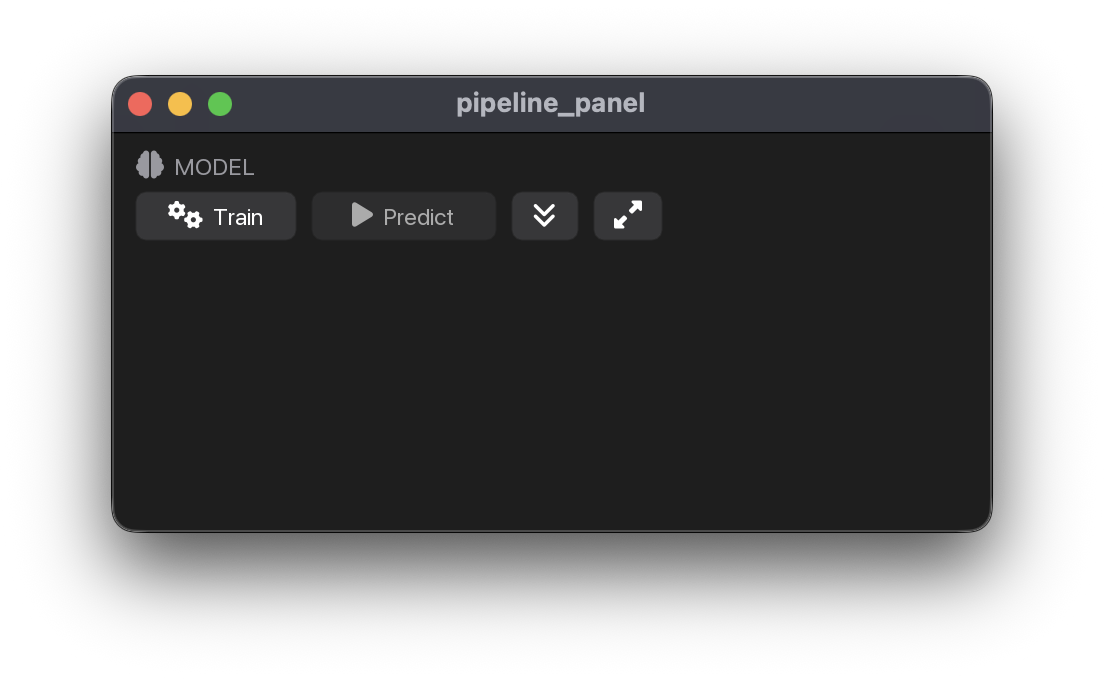
Train + Predict + log as a single titled panel — matches the visual style of recording_controls, session_manager, and FilterControl.

The log inherits the same autoscroll + popout UX as the process launcher's log: a double-chevron-down icon toggles auto-tail-follow, a box-out icon detaches the log into a floating ImGui window that survives across selection / frame churn.

Source code in myogestic/ml/widgets.py
def pipeline_panel(
    pipeline: Pipeline,
    *,
    log_height: float = 80.0,
    widget_id: str = "ml",
) -> None:
    """Train + Predict + log as a single titled panel — matches the visual
    style of `recording_controls`, `session_manager`, and `FilterControl`.

    The log inherits the same autoscroll + popout UX as the process
    launcher's log: a double-chevron-down icon toggles auto-tail-follow,
    a box-out icon detaches the log into a floating ImGui window that
    survives across selection / frame churn.
    """
    # Render any open popout first so it survives frames even when the
    # surrounding panel scrolls out of view (same pattern as
    # process_launcher._render_open_popouts).
    if _popout_open.get(widget_id, False):
        autoscroll = _autoscroll.setdefault(widget_id, True)
        still_open = render_log_popout(
            widget_id,
            pipeline.train_log,
            title="Model training log",
            autoscroll=autoscroll,
        )
        if not still_open:
            _popout_open[widget_id] = False

    panel_header("MODEL", fa.ICON_FA_BRAIN)
    train_button(pipeline)
    imgui.same_line()
    predict_button(pipeline)

    # Autoscroll + popout toggles, same look as the process launcher.
    imgui.same_line()
    autoscroll = _autoscroll.setdefault(widget_id, True)
    popped = _popout_open.get(widget_id, False)
    autoscroll, popped = render_log_buttons(
        widget_id, autoscroll=autoscroll, popped_out=popped
    )
    _autoscroll[widget_id] = autoscroll
    _popout_open[widget_id] = popped

    if popped:
        imgui.text_disabled(
            "(log popped out — see 'Model training log' window)"
        )
    elif pipeline.train_log:
        render_log(
            widget_id,
            pipeline.train_log,
            height=log_height,
            autoscroll=autoscroll,
        )

pipeline_panel