Integrate the Virtual Hand Interface
The Virtual Hand Interface (VHI) is the Godot-based 3-D hand visualisation that ships alongside MyoGestic. It is the remote target this project ships with: a separate application, read from over LSL and commanded over gRPC.
So this page is only what is true of this target: where it is installed, how it is launched, what it calls its controls, and how to drive its control hand while recording. How the two planes work at all is Drive a remote target; what a control map is and how you declare what you drive is Concepts › Controls, with the full rules in the control standard.
If VHI isn't installed yet, see Install the Virtual Hand.
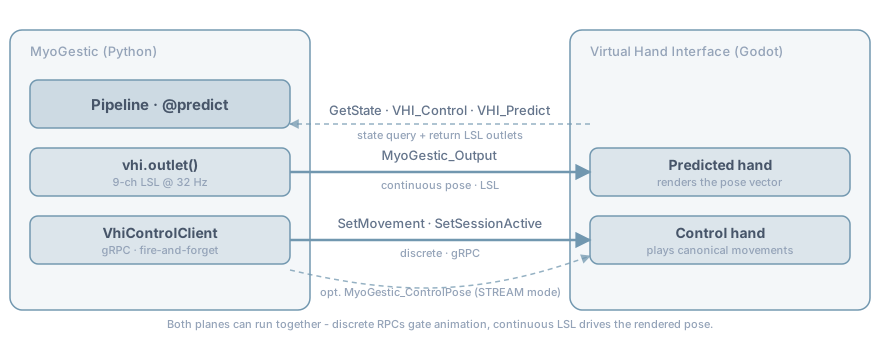
The one-liner that wires it up
from myogestic.vhi import virtual_hand

vhi = virtual_hand()                 # resolves install path + gRPC endpoint
vhi_control = vhi.control_client()   # negotiates the control space (v2)
recording = vhi.recording_client()   # recording session gate + trajectory playback
virtual_hand() looks at $VHI_PATH, the per-user install root, and the local git checkout
in that order. It reads $VHI_GRPC_HOST / $VHI_GRPC_PORT for the control endpoint
(defaults 127.0.0.1:50051).
Those three lines are the whole VHI-shaped part of pointing MyoGestic at it. The returned
InterfaceSpec knows where VHI is and nothing about what
VHI drives. Which controls exist is a running VHI's answer, and each one's stream is named for
its own address, so there is no table on this side to go stale. Handing that spec and its
client to a RemoteTarget is what asks:
from myogestic.controls import ControlLink
from myogestic.remote import RemoteTarget

link = ControlLink(CONTROL_MAP, [RemoteTarget(client=vhi_control, interface=vhi)], hz=32)
One target drives the whole map, both hands included; no stream is named and none is counted.
See Negotiating with the target for what that
resolves and what it refuses, and Binding retries while the target is
unavailable for why this is a
ControlLink and not a bus: an application that launches VHI from its own button necessarily
binds before VHI exists.
Launching the VHI process
Drop the launcher into your ProcessLauncher panel and the user gets
a Start/Stop button for VHI:
import sys
from myogestic.widgets import ProcessLauncher

PROCESSES = [
    ("EMG Generator", [sys.executable, "-m", "myogestic.tools.emg_generator",
                       "--name", "TestEMG1", "--channels", "8", "--fs", "2048"]),
    *vhi.launcher(),
]

launcher = ProcessLauncher(PROCESSES)

@app.ui
def ui(ctx):
    with grid[0, 0]:
        launcher.ui()
vhi.launcher() prefers a packaged binary install when present and
falls back to godot --path <project> for source-mode development. Set
$VHI_LAUNCH_MODE=binary or =godot to force one.
If VHI is not installed, launcher() raises FileNotFoundError with the
exact install_vhi command to run. Surface this as a status message:
try:
    PROCESSES = [*base, *vhi.launcher()]
except FileNotFoundError as e:
    print(f"[demo] {e}", file=sys.stderr)
    PROCESSES = base       # demo still runs; VHI button just absent
What VHI calls its controls
A running VHI's manifest is the authority
(uv run --extra grpc python tools/inspect_control.py prints it), but the shape of the
vocabulary is worth knowing before you write a map, because the address picks the hand:
| address | drives |
|---|---|
vhi.prediction.thumb.flexion, vhi.prediction.thumb.abduction |
the predicted hand's thumb, two axes |
vhi.prediction.index, .middle, .ring, .little |
the predicted hand's other four digits, one axis each |
vhi.prediction.wrist.flexion, .abduction, .rotation |
the predicted hand's wrist |
vhi.control.pose.* |
the same digits on the control hand, the one the operator poses and a recording captures |
vhi.control.gesture |
the control hand's movement presets, as a discrete control |
vhi.control.gesture's states are whole-hand poses: Fist, ThumbExtension and the rest of
what that VHI build ships. A preset is a held state and not a number because it commands a
compound shape no single continuous address expresses. VHI supplies the state names, so push
one of those; what you write yourself is debounce_s, a property of your control loop and
not of the hand.
Sliders can pose the operator's hand while a model drives the predicted one, and a map naming
both is still one RemoteTarget and one bus. The two hands are simply more addresses.
examples/start_here/myocontrol.py
is this table as a complete protocol: a model fanning out to the predicted digits while
vhi.control.gesture cues the subject on the other hand, over one map and one bus.
The nine channels of a recorded pose
VHI publishes two read-backs, VHI_Predict and VHI_Control, so a client can see what
actually moved. Both are nine positional float32 channels, whatever the inbound shape. A
recorded session carries that same layout, so the table below matters even though nothing
writes it any more. It was read out of VHI's own consumer (PredictedHandSkeleton) and
confirmed against recorded sessions; myogestic.vhi.pose is the layout in code:
| Index | Joint | Notes |
|---|---|---|
| 0 | Thumb flexion | bones ½/3, X axis |
| 1 | Thumb abduction | bones ½/3, Z axis |
| 2 | Index flexion | |
| 3 | Middle flexion | |
| 4 | Ring flexion | |
| 5 | Little flexion | |
| 6-8 | Wrist flexion, abduction, rotation | bone 0, which parents every digit |
Two things about that table are easy to get wrong, and both were settled by measurement, not by
reading. Channel 0 is thumb flexion and channel 1 thumb abduction, not the other way
round: a recorded fist has channel 1 at exactly -1.0, because the thumb comes across the
fingers. And channels 6-8 do drive the wrist. They read 0 in archived sessions because
the recorder hardcoded them, not because VHI ignores them.
A ready-made movement palette
VhiMovementPanel packages "fetch control-hand state in the background, render the movement
buttons, dispatch clicks" into one widget. It reads the recording aid for state and takes the
click handler explicitly. Wire that handler to a control-standard DOF (one degree of
freedom), because dispatching straight at the target would
bypass the debounce:
from myogestic.widgets.vhi.panel import VhiMovementPanel

panel = VhiMovementPanel(
    recording,
    lambda state: bus.select("gesture", state),
)

@app.ui
def ui(ctx):
    with grid[8, 0]:
        panel.ui()
The handler is where you layer side-effects on a click. Snap a session label, drive a fake generator, whatever the experiment needs:
def _on_movement_click(name: str) -> None:
    ctrl_outlet.push_sample(...)                    # e.g. drive the EMG generator
    bus.select("gesture", name)                     # deliver + rebase the debounce
bus.select is the
important part: it delivers the state immediately and rebases the DOF's stability gate, so
the next predict ticks do not re-fire what the button just did.
Driving the control hand as ground truth
Some workflows want the control hand to move on its own so the recorded kinematics sweep a range. Continuous regression is one, where the control hand is the regression target the model learns. The recording aid is for that:
recording.start_trajectory("Fist", frequency_hz=0.7)   # cycles, producing a trajectory
...
recording.stop_trajectory()                            # stops and rests the hand
While a trajectory runs it owns the control hand, and discrete DOFs are refused with a reason; nothing silently interrupts it. See Recording is not control for why the sweep lives here and not in the control standard.
Wrap a recording in the session gate so VHI's local keyboard cannot compete as a movement source:
def _on_record() -> None:
    app.start_recording()
    if not recording.set_recording_session(True):
        app.ctx.log("no VHI recording gate — the keyboard is not blocked")
It returns False and does not raise when the aid is unavailable, because whether an ungated
recording is acceptable is a judgement about experiment integrity and not the client's to make.
Testing without VHI
print is the cheapest viewer:
@pipeline.predict
def predict(model, features):
    pose = model.compose_pose(features)
    print(f"pose: {[f'{v:+.2f}' for v in pose]}")
    return {"pose": pose}
Or point uv run mne-lsl viewer at one of the streams: vhi.prediction.index for a single DOF
going out, VHI_Predict for all nine coming back. For the gRPC plane, the standard grpcurl
works against the local server when VHI is running. The proto is at
myogestic/remote/_proto/remote_control.proto.
tools/inspect_control.py needs no Virtual Hand at all: it walks declaration, resolution and
the wire frame with nothing launched, and then shows what a target does when the far side is
absent.
Common mistakes
See the full Troubleshooting index for symptom-organised debugging, and Controls › Common mistakes for the ones that are about the control standard rather than about VHI.
- Forgetting
set_recording_session(False)on session end. VHI keeps ignoring its own keyboard until you toggle it back. - Leaving a recording trajectory running. It keeps the control hand moving and
refuses discrete DOFs.
stop_trajectory()is idempotent, so call it in teardown regardless. - Forgetting
pose_filter.reset()on retrain. The first few smoothed frames blend the new model's first prediction with the old model's last; looks like a brief pose drift on every train cycle. See Post-process predictions.
See also
- Install the Virtual Hand - the installer CLI.
- Drive a remote target - the contract VHI serves, and what MyoGestic calls on it.
- Control standard - declaring a map, negotiation, the three layers of smoothing.
- Edge trigger - fire-on-change pattern.
- Examples directory - every shipped example wires VHI either via LSL, gRPC, or both.
myogestic.vhi.virtual_hand- full signature.myogestic.widgets.vhi.panel.VhiMovementPanel- movement palette API.