
Note
Go to the end to download the full example code.
Loading and Inspecting NWB Data#
This example demonstrates how to load, validate, and inspect NWB (Neurodata Without Borders) files created by MyoGen simulations.
NWB is a standardized data format for neurophysiology that enables: - Data sharing: Upload to DANDI Archive for community access - Interoperability: Compatible with many neuroscience analysis tools - Validation: Built-in schema validation ensures data integrity - Metadata: Rich experimental metadata travels with the data
Learning Objectives#
Validate NWB files: Use NWBInspector to check file compliance
Load NWB data: Read simulation results back into Python
Explore data structure: Navigate the hierarchical NWB format
Extract signals: Access spike trains, analog signals, and metadata
Compare formats: Understand NWB vs pickle tradeoffs
Prerequisites#
This example requires an NWB file from example 11 (spinal_network_results.nwb).
Note
If you haven’t run example 11, this example will create a minimal NWB file for demonstration purposes.
Import Libraries#
from pathlib import Path

import matplotlib.pyplot as plt
import numpy as np

plt.style.use("fivethirtyeight")
Import NWB Libraries#
import pynwb
from pynwb import NWBHDF5IO
from nwbinspector import inspect_nwbfile
from nwbinspector.inspector_tools import format_messages

print(f"(OK) PyNWB version: {pynwb.__version__}")
print("(OK) NWBInspector available")
/home/runner/work/MyoGen/MyoGen/examples/01_basic/13_load_and_inspect_nwb_data.py:53: DeprecationWarning: The 'inspector_tools' submodule has been deprecated. Please import the helper functions from the top-level package.
  from nwbinspector.inspector_tools import format_messages
(OK) PyNWB version: 3.1.3
(OK) NWBInspector available
Locate NWB File#
Look for the NWB file created by example 11. If not found, we’ll create a minimal example file for demonstration.
save_path = Path(r"./results")
nwb_filepath = save_path / "spinal_network_results.nwb"

if not nwb_filepath.exists():
    print(f"\n(WARN) NWB file not found: {nwb_filepath}")
    print("Creating a minimal demonstration NWB file...")

    # Create a minimal NWB file for demonstration
    from datetime import datetime, timezone

    import quantities as pq
    from neo import AnalogSignal, Block, Segment, SpikeTrain

    from myogen import get_random_generator
    from myogen.utils.nwb import export_to_nwb

    # Create sample data
    demo_block = Block(name="Demo_Simulation")
    segment = Segment(name="Demo_Segment")
    demo_block.segments.append(segment)

    # Add sample spike trains
    for i in range(5):
        spike_times = np.sort(get_random_generator().uniform(0, 1000, size=50)) * pq.ms
        st = SpikeTrain(spike_times, t_stop=1000 * pq.ms, units="ms")
        st.annotate(neuron_id=i, population="aMN")
        segment.spiketrains.append(st)

    # Add sample analog signal
    time_points = 10000
    signal_data = np.sin(np.linspace(0, 10 * np.pi, time_points)).reshape(-1, 1)
    analog = AnalogSignal(
        signal_data * pq.mV,
        sampling_rate=10000 * pq.Hz,
        name="muscle_force",
    )
    segment.analogsignals.append(analog)

    # Export to NWB
    save_path.mkdir(exist_ok=True)
    export_to_nwb(
        demo_block,
        nwb_filepath,
        session_description="Demonstration NWB file for MyoGen tutorial",
        institution="MyoGen Tutorial",
        # Pass an explicit session_start_time so the demo is fully reproducible
        # and avoids the new "no session_start_time" UserWarning.
        session_start_time=datetime(1970, 1, 1, tzinfo=timezone.utc),
    )
    print(f"(OK) Created demonstration NWB file: {nwb_filepath}")
else:
    print(f"\n(OK) Found NWB file: {nwb_filepath}")
    print(f"    Size: {nwb_filepath.stat().st_size / 1024:.1f} KB")
(OK) Found NWB file: results/spinal_network_results.nwb
    Size: 188450.1 KB
Step 1: Validate NWB File#
Before loading, it’s good practice to validate the NWB file using NWBInspector. This checks for schema compliance and best practices.
print("\n" + "=" * 60)
print("STEP 1: NWB FILE VALIDATION")
print("=" * 60)

print(f"\nValidating: {nwb_filepath.name}")
print("-" * 40)

# Run inspection
messages = list(inspect_nwbfile(nwbfile_path=str(nwb_filepath)))

if not messages:
    print("✓ No issues found - file is valid!")
else:
    # Categorize messages by severity
    critical = [m for m in messages if m.importance.name == "CRITICAL"]
    errors = [m for m in messages if m.importance.name == "ERROR"]
    warnings = [m for m in messages if m.importance.name == "WARNING"]
    best_practice = [m for m in messages if m.importance.name == "BEST_PRACTICE_VIOLATION"]

    print(f"Found {len(messages)} message(s):")
    if critical:
        print(f"  ✗ Critical: {len(critical)}")
    if errors:
        print(f"  ✗ Errors: {len(errors)}")
    if warnings:
        print(f"  ⚠ Warnings: {len(warnings)}")
    if best_practice:
        print(f"  ○ Best practice suggestions: {len(best_practice)}")

    # Show formatted messages
    print("\nDetails:")
    print(format_messages(messages[:10]))  # Limit to first 10
    if len(messages) > 10:
        print(f"  ... and {len(messages) - 10} more messages")
============================================================
STEP 1: NWB FILE VALIDATION
============================================================

Validating: spinal_network_results.nwb
----------------------------------------
Found 28 message(s):
  ✗ Critical: 3
  ○ Best practice suggestions: 1

Details:
['**************************************************', 'NWBInspector Report Summary', '', 'Timestamp: 2026-06-01 10:09:10.190074+00:00', 'Platform: Linux-6.17.0-1015-azure-x86_64-with-glibc2.39', 'NWBInspector version: 0.7.2', '', 'Found 10 issues across 1 file(s):', '       1 - BEST_PRACTICE_VIOLATION', '       9 - BEST_PRACTICE_SUGGESTION', '**************************************************', '', '', '0  results/spinal_network_results.nwb', '=====================================', '', "0.0  Importance.BEST_PRACTICE_VIOLATION: check_units_resolution_is_set - 'Units' object with name 'units'", '       Message: Units table has spike_times but resolution is not set. Resolution indicates the smallest possible difference between two spike times and should be a positive float equal to 1/sampling_rate of the recording system (e.g., Units(resolution=1/30000) for a 30 kHz system). This information is needed to assess the precision of spike timing data.', '', "0.1  Importance.BEST_PRACTICE_SUGGESTION: check_description - 'TimeSeries' object at location '/acquisition/spin_secondary_afferent_firing__Hz'", "       Message: Description ('no description') is a placeholder.", '', "0.2  Importance.BEST_PRACTICE_SUGGESTION: check_description - 'TimeSeries' object at location '/acquisition/spin_primary_afferent_firing__Hz'", "       Message: Description ('no description') is a placeholder.", '', "0.3  Importance.BEST_PRACTICE_SUGGESTION: check_description - 'TimeSeries' object at location '/acquisition/spin_intrafusal_tensions'", "       Message: Description ('no description') is a placeholder.", '', "0.4  Importance.BEST_PRACTICE_SUGGESTION: check_description - 'TimeSeries' object at location '/acquisition/spin_chain_activation'", "       Message: Description ('no description') is a placeholder.", '', "0.5  Importance.BEST_PRACTICE_SUGGESTION: check_description - 'TimeSeries' object at location '/acquisition/spin_bag2_activation'", "       Message: Description ('no description') is a placeholder.", '', "0.6  Importance.BEST_PRACTICE_SUGGESTION: check_description - 'TimeSeries' object at location '/acquisition/spin_bag1_activation'", "       Message: Description ('no description') is a placeholder.", '', "0.7  Importance.BEST_PRACTICE_SUGGESTION: check_description - 'TimeSeries' object at location '/acquisition/hill_muscle_type2_activation'", "       Message: Description ('no description') is a placeholder.", '', "0.8  Importance.BEST_PRACTICE_SUGGESTION: check_description - 'TimeSeries' object at location '/acquisition/hill_muscle_type1_activation'", "       Message: Description ('no description') is a placeholder.", '', "0.9  Importance.BEST_PRACTICE_SUGGESTION: check_description - 'TimeSeries' object at location '/acquisition/hill_muscle_muscle_torque'", "       Message: Description ('no description') is a placeholder.", '']
  ... and 18 more messages
Step 2: Load NWB File#
Open the NWB file and explore its structure. NWB uses HDF5 format internally, which supports efficient storage of large datasets.
print("\n" + "=" * 60)
print("STEP 2: LOADING NWB FILE")
print("=" * 60)

# Open the NWB file
io = NWBHDF5IO(str(nwb_filepath), mode="r")
nwbfile = io.read()

print(f"\nNWB File: {nwbfile.identifier}")
print(f"Session: {nwbfile.session_description}")
print(f"Created: {nwbfile.session_start_time}")
if nwbfile.institution:
    print(f"Institution: {nwbfile.institution}")
if nwbfile.lab:
    print(f"Lab: {nwbfile.lab}")
if nwbfile.keywords:
    print(f"Keywords: {', '.join(nwbfile.keywords)}")
============================================================
STEP 2: LOADING NWB FILE
============================================================

NWB File: d99307bc-7a28-5b12-84b8-50abe1d59f93
Session: MyoGen spinal network simulation with systematic tendon tap protocol. Two-phase design: (1) Reflex gain modulation with varying gamma drive, (2) Reflex-voluntary interaction with sinusoidal cortical drive.
Created: 1970-01-01 00:00:00+00:00
Institution: MyoGen Framework
Lab: Neuromuscular Simulation
Keywords: MyoGen, spinal network, motor neuron, stretch reflex, tendon tap, proprioception, EMG simulation
Step 3: Explore Data Structure#
NWB organizes data hierarchically. Let’s explore what’s available.
print("\n" + "=" * 60)
print("STEP 3: DATA STRUCTURE")
print("=" * 60)

# Acquisition data (raw recordings)
print("\n📁 Acquisition (raw data):")
if nwbfile.acquisition:
    for name, data in nwbfile.acquisition.items():
        print(f"  └─ {name}: {type(data).__name__}")
        if hasattr(data, "data"):
            print(f"      Shape: {data.data.shape if hasattr(data.data, 'shape') else 'N/A'}")
        if hasattr(data, "unit"):
            print(f"      Unit: {data.unit}")
else:
    print("  (empty)")

# Processing modules
print("\n📁 Processing modules:")
if nwbfile.processing:
    for mod_name, module in nwbfile.processing.items():
        print(f"  └─ {mod_name}:")
        for container_name in module.data_interfaces:
            container = module.data_interfaces[container_name]
            print(f"      └─ {container_name}: {type(container).__name__}")
else:
    print("  (empty)")

# Units (spike times)
print("\n📁 Units (spike data):")
if nwbfile.units is not None and len(nwbfile.units) > 0:
    n_units = len(nwbfile.units.id[:])
    print(f"  └─ {n_units} units recorded")
    # Show column names
    columns = list(nwbfile.units.colnames)
    print(f"      Columns: {', '.join(columns[:5])}")
    if len(columns) > 5:
        print(f"               ... and {len(columns) - 5} more")
else:
    print("  (empty)")

# Stimulus
print("\n📁 Stimulus:")
if nwbfile.stimulus:
    for name, data in nwbfile.stimulus.items():
        print(f"  └─ {name}: {type(data).__name__}")
else:
    print("  (empty)")
============================================================
STEP 3: DATA STRUCTURE
============================================================

📁 Acquisition (raw data):
  └─ aMN_cell0_Vm: TimeSeries
      Shape: (1000001, 1)
      Unit: mV
  └─ aMN_cell10_Vm: TimeSeries
      Shape: (1000001, 1)
      Unit: mV
  └─ aMN_cell15_Vm: TimeSeries
      Shape: (1000001, 1)
      Unit: mV
  └─ aMN_cell20_Vm: TimeSeries
      Shape: (1000001, 1)
      Unit: mV
  └─ aMN_cell30_Vm: TimeSeries
      Shape: (1000001, 1)
      Unit: mV
  └─ aMN_cell40_Vm: TimeSeries
      Shape: (1000001, 1)
      Unit: mV
  └─ aMN_cell50_Vm: TimeSeries
      Shape: (1000001, 1)
      Unit: mV
  └─ aMN_cell5_Vm: TimeSeries
      Shape: (1000001, 1)
      Unit: mV
  └─ aMN_cell60_Vm: TimeSeries
      Shape: (1000001, 1)
      Unit: mV
  └─ aMN_cell70_Vm: TimeSeries
      Shape: (1000001, 1)
      Unit: mV
  └─ gto_ib_afferent_firing__Hz: TimeSeries
      Shape: (1000001, 1)
      Unit: dimensionless
  └─ hill_muscle_muscle_force: TimeSeries
      Shape: (1000001, 1)
      Unit: dimensionless
  └─ hill_muscle_muscle_length: TimeSeries
      Shape: (1000001, 1)
      Unit: dimensionless
  └─ hill_muscle_muscle_torque: TimeSeries
      Shape: (1000001, 1)
      Unit: dimensionless
  └─ hill_muscle_type1_activation: TimeSeries
      Shape: (1000001, 1)
      Unit: dimensionless
  └─ hill_muscle_type2_activation: TimeSeries
      Shape: (1000001, 1)
      Unit: dimensionless
  └─ spin_bag1_activation: TimeSeries
      Shape: (1000001, 1)
      Unit: dimensionless
  └─ spin_bag2_activation: TimeSeries
      Shape: (1000001, 1)
      Unit: dimensionless
  └─ spin_chain_activation: TimeSeries
      Shape: (1000001, 1)
      Unit: dimensionless
  └─ spin_intrafusal_tensions: TimeSeries
      Shape: (3, 1000001)
      Unit: dimensionless
  └─ spin_primary_afferent_firing__Hz: TimeSeries
      Shape: (1000001, 1)
      Unit: dimensionless
  └─ spin_secondary_afferent_firing__Hz: TimeSeries
      Shape: (1000001, 1)
      Unit: dimensionless

📁 Processing modules:
  (empty)

📁 Units (spike data):
  └─ 963 units recorded
      Columns: _name, segment, block, spike_times, obs_intervals

📁 Stimulus:
  (empty)
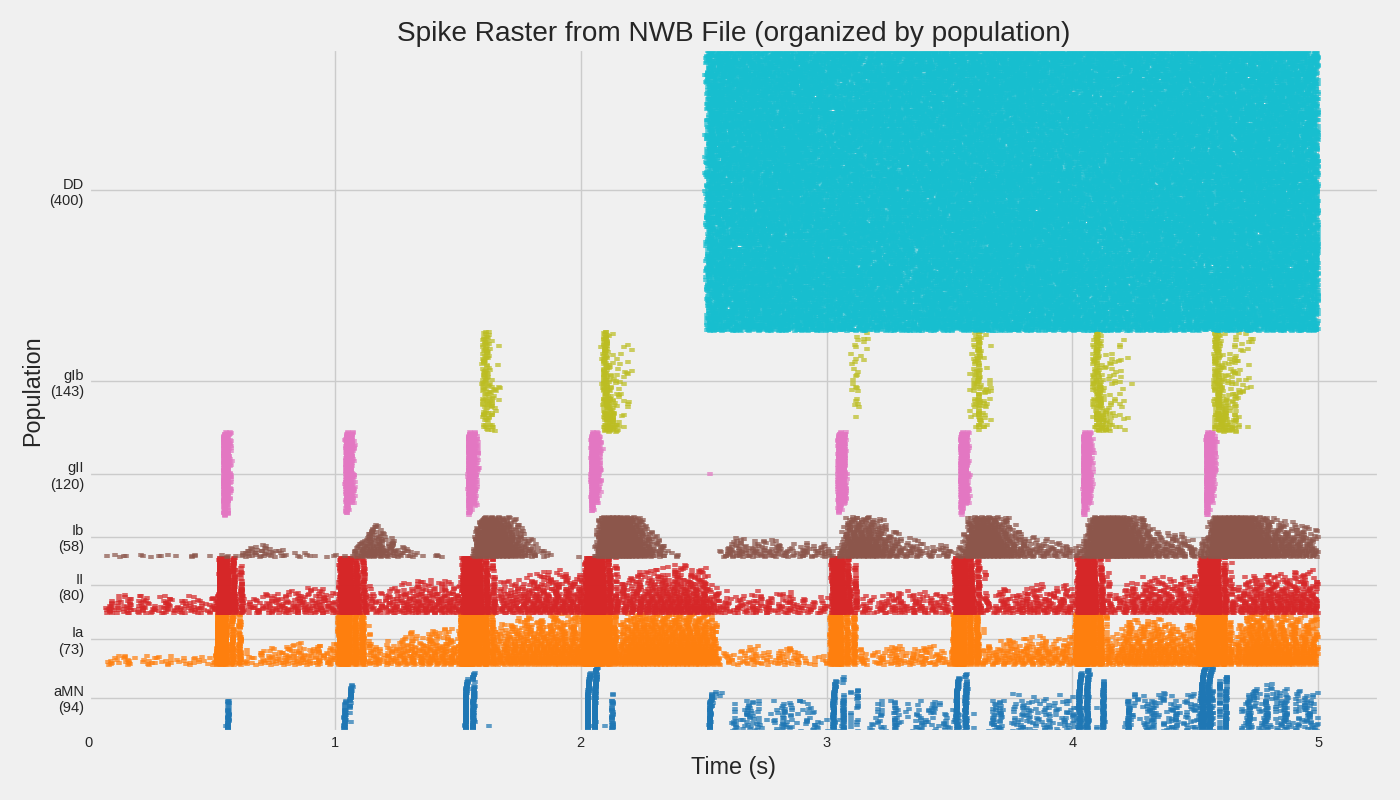
Step 4: Extract and Plot Spike Data#
If the NWB file contains spike data, let’s extract and visualize it.
print("\n" + "=" * 60)
print("STEP 4: EXTRACTING SPIKE DATA")
print("=" * 60)

if nwbfile.units is not None and len(nwbfile.units) > 0:
    # Get unit info - names contain population info like "aMN_cell0_spikes"
    unit_ids = nwbfile.units.id[:]
    unit_names = nwbfile.units["_name"][:] if "_name" in nwbfile.units.colnames else None

    print(f"\nFound {len(unit_ids)} units")

    # Group units by population (parse from name like "aMN_cell0_spikes")
    populations = {}
    for i, unit_id in enumerate(unit_ids):
        name = unit_names[i] if unit_names is not None else f"unit_{unit_id}"
        # Parse population from "popName_cellN_spikes" format
        if "_cell" in name:
            pop_name = name.split("_cell")[0]
        else:
            pop_name = "unknown"

        if pop_name not in populations:
            populations[pop_name] = []

        spike_times = nwbfile.units.get_unit_spike_times(unit_id)
        populations[pop_name].append((name, spike_times))

    print(f"Populations found: {list(populations.keys())}")
    for pop, units in populations.items():
        total_spikes = sum(len(st) for _, st in units)
        print(f"  {pop}: {len(units)} units, {total_spikes} total spikes")

    # Create raster plot organized by population (like example 11)
    pop_order = ["aMN", "Ia", "II", "Ib", "gII", "gIb"]  # Preferred order
    sorted_pops = [p for p in pop_order if p in populations]
    sorted_pops += [p for p in populations if p not in sorted_pops]  # Add any others

    fig, ax = plt.subplots(figsize=(14, 8))
    colors = plt.cm.tab10(np.linspace(0, 1, len(sorted_pops)))

    y_offset = 0
    y_ticks = []
    y_labels = []

    for pop_idx, pop_name in enumerate(sorted_pops):
        units = populations[pop_name]
        pop_start_y = y_offset

        for unit_name, spike_times in units:
            if len(spike_times) > 0:
                ax.scatter(
                    spike_times,
                    np.ones_like(spike_times) * y_offset,
                    marker="|",
                    s=8,
                    color=colors[pop_idx],
                    alpha=0.7,
                )
            y_offset += 1

        # Add population label at midpoint
        y_ticks.append((pop_start_y + y_offset) / 2)
        y_labels.append(f"{pop_name}\n({len(units)})")

    ax.set_xlabel("Time (s)")
    ax.set_ylabel("Population")
    ax.set_yticks(y_ticks)
    ax.set_yticklabels(y_labels)
    ax.set_title("Spike Raster from NWB File (organized by population)")
    ax.set_xlim(0, None)
    ax.set_ylim(-1, y_offset)

    plt.tight_layout()
    plt.savefig(save_path / "nwb_spike_raster.png", dpi=150, bbox_inches="tight")
    plt.show()
    print(f"\n(OK) Saved raster plot to: {save_path / 'nwb_spike_raster.png'}")
else:
    print("\nNo spike data found in this NWB file")
============================================================
STEP 4: EXTRACTING SPIKE DATA
============================================================

Found 963 units
Populations found: ['DD', 'aMN', 'Ia', 'II', 'Ib', 'gII', 'gIb']
  DD: 400 units, 39820 total spikes
  aMN: 93 units, 2067 total spikes
  Ia: 73 units, 11843 total spikes
  II: 80 units, 8691 total spikes
  Ib: 58 units, 4623 total spikes
  gII: 120 units, 1927 total spikes
  gIb: 139 units, 859 total spikes

(OK) Saved raster plot to: results/nwb_spike_raster.png
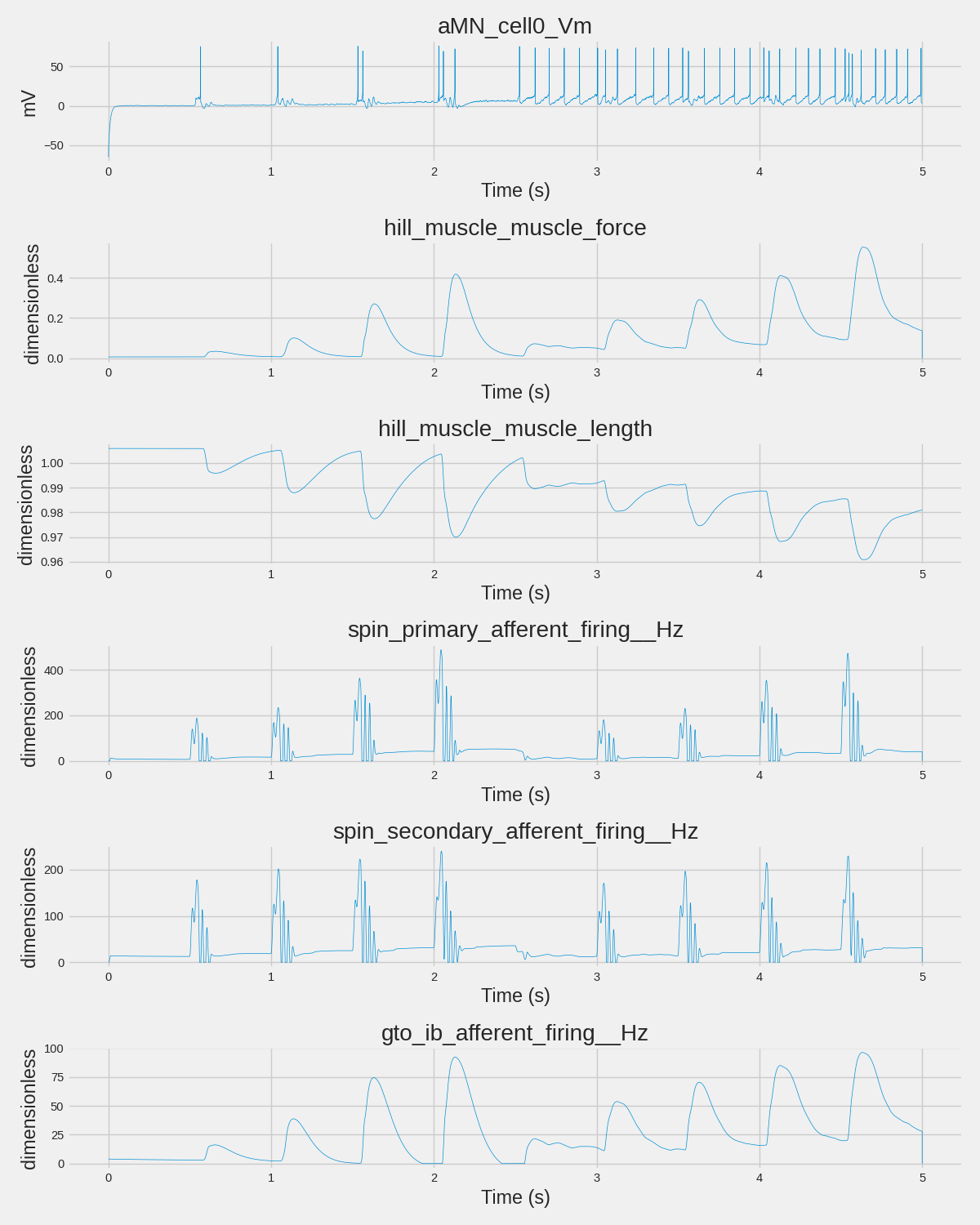
Step 5: Extract and Plot Analog Signals#
Let’s look at any continuous time series data in the file.
print("\n" + "=" * 60)
print("STEP 5: EXTRACTING ANALOG SIGNALS")
print("=" * 60)


def get_timestamps(data):
    """Get timestamps from NWB TimeSeries, handling both explicit and rate-based."""
    if data.timestamps is not None:
        return data.timestamps[:]
    elif data.rate is not None:
        # Generate timestamps from starting_time and rate
        n_samples = data.data.shape[0]
        start = data.starting_time if data.starting_time is not None else 0.0
        return np.linspace(start, start + n_samples / data.rate, n_samples)
    else:
        # Fallback to sample indices
        return np.arange(data.data.shape[0])


# Check acquisition for time series
analog_signals = []
for name, data in nwbfile.acquisition.items():
    if hasattr(data, "data"):
        analog_signals.append((name, data))

print(f"\nFound {len(analog_signals)} analog signals in acquisition:")
for name, data in analog_signals[:10]:  # Show first 10
    print(f"  - {name}: shape={data.data.shape}, unit={getattr(data, 'unit', 'N/A')}")
if len(analog_signals) > 10:
    print(f"  ... and {len(analog_signals) - 10} more")

# Select representative signals from different categories
signals_to_plot = []
signal_dict = {name: data for name, data in analog_signals}

# Pick one from each category for a representative view
representative_patterns = [
    "aMN_cell0_Vm",  # Membrane potential
    "hill_muscle_muscle_force",  # Muscle force
    "hill_muscle_muscle_length",  # Muscle length
    "spin_primary_afferent_firing__Hz",  # Spindle Ia
    "spin_secondary_afferent_firing__Hz",  # Spindle II
    "gto_ib_afferent_firing__Hz",  # GTO Ib
]

for pattern in representative_patterns:
    if pattern in signal_dict:
        signals_to_plot.append((pattern, signal_dict[pattern]))

# Fallback to first 4 if no matches
if not signals_to_plot:
    signals_to_plot = analog_signals[:4]

if signals_to_plot:
    print(f"\nPlotting {len(signals_to_plot)} representative signals...")
    fig, axes = plt.subplots(len(signals_to_plot), 1, figsize=(12, 2.5 * len(signals_to_plot)))
    if len(signals_to_plot) == 1:
        axes = [axes]

    for ax, (name, data) in zip(axes, signals_to_plot):
        values = data.data[:]
        if values.ndim > 1:
            values = values[:, 0]  # Take first channel if multi-channel
        timestamps = get_timestamps(data)

        ax.plot(timestamps, values, linewidth=0.5)
        ax.set_xlabel("Time (s)")
        ax.set_ylabel(f"{getattr(data, 'unit', 'a.u.')}")
        ax.set_title(name)

    plt.tight_layout()
    plt.savefig(save_path / "nwb_analog_signals.png", dpi=150, bbox_inches="tight")
    plt.show()
    print(f"(OK) Saved analog signal plot to: {save_path / 'nwb_analog_signals.png'}")
else:
    print("\nNo analog signals found in acquisition")
============================================================
STEP 5: EXTRACTING ANALOG SIGNALS
============================================================

Found 22 analog signals in acquisition:
  - aMN_cell0_Vm: shape=(1000001, 1), unit=mV
  - aMN_cell10_Vm: shape=(1000001, 1), unit=mV
  - aMN_cell15_Vm: shape=(1000001, 1), unit=mV
  - aMN_cell20_Vm: shape=(1000001, 1), unit=mV
  - aMN_cell30_Vm: shape=(1000001, 1), unit=mV
  - aMN_cell40_Vm: shape=(1000001, 1), unit=mV
  - aMN_cell50_Vm: shape=(1000001, 1), unit=mV
  - aMN_cell5_Vm: shape=(1000001, 1), unit=mV
  - aMN_cell60_Vm: shape=(1000001, 1), unit=mV
  - aMN_cell70_Vm: shape=(1000001, 1), unit=mV
  ... and 12 more

Plotting 6 representative signals...
(OK) Saved analog signal plot to: results/nwb_analog_signals.png
Step 6: Compare with Pickle Format#
Let’s compare loading from NWB vs the original pickle format.
print("\n" + "=" * 60)
print("STEP 6: NWB vs PICKLE COMPARISON")
print("=" * 60)

pickle_filepath = save_path / "spinal_network_results.pkl"

print("\nFormat Comparison:")
print("-" * 50)
print(f"{'Feature':<25} {'NWB':<15} {'Pickle':<15}")
print("-" * 50)

# File existence
nwb_exists = "✓" if nwb_filepath.exists() else "✗"
pkl_exists = "✓" if pickle_filepath.exists() else "✗"
print(f"{'File exists':<25} {nwb_exists:<15} {pkl_exists:<15}")

# File size
if nwb_filepath.exists():
    nwb_size = f"{nwb_filepath.stat().st_size / 1024:.1f} KB"
else:
    nwb_size = "N/A"
if pickle_filepath.exists():
    pkl_size = f"{pickle_filepath.stat().st_size / 1024:.1f} KB"
else:
    pkl_size = "N/A"
print(f"{'File size':<25} {nwb_size:<15} {pkl_size:<15}")

# Format properties
print(f"{'Standardized format':<25} {'Yes':<15} {'No':<15}")
print(f"{'Schema validation':<25} {'Yes':<15} {'No':<15}")
print(f"{'Cross-language support':<25} {'Yes (HDF5)':<15} {'Python only':<15}")
print(f"{'DANDI Archive upload':<25} {'Yes':<15} {'No':<15}")
print(f"{'Metadata schema':<25} {'Rich':<15} {'Flexible':<15}")
print(f"{'Load speed':<25} {'Fast':<15} {'Fast':<15}")
print("-" * 50)

print("\nRecommendations:")
print("  • Use NWB for: Sharing data, long-term archival, interoperability")
print("  • Use Pickle for: Quick local saves, complex Python objects, development")
============================================================
STEP 6: NWB vs PICKLE COMPARISON
============================================================

Format Comparison:
--------------------------------------------------
Feature                   NWB             Pickle
--------------------------------------------------
File exists               ✓               ✓
File size                 188450.1 KB     188358.9 KB
Standardized format       Yes             No
Schema validation         Yes             No
Cross-language support    Yes (HDF5)      Python only
DANDI Archive upload      Yes             No
Metadata schema           Rich            Flexible
Load speed                Fast            Fast
--------------------------------------------------

Recommendations:
  • Use NWB for: Sharing data, long-term archival, interoperability
  • Use Pickle for: Quick local saves, complex Python objects, development
Cleanup#
Close the NWB file handle.
io.close()
print("\n(OK) NWB file closed")
(OK) NWB file closed
Summary#
This example demonstrated:
Validation: Using NWBInspector to check file compliance
Loading: Opening NWB files with PyNWB
Structure exploration: Navigating the hierarchical format
Data extraction: Accessing spikes and analog signals
Format comparison: Understanding NWB vs pickle tradeoffs
For more information:
NWB documentation: https://pynwb.readthedocs.io/
NWBInspector: https://nwbinspector.readthedocs.io/
DANDI Archive: https://dandiarchive.org/
NWB Overview: https://nwb-overview.readthedocs.io/
print("\n" + "=" * 60)
print("EXAMPLE COMPLETE")
print("=" * 60)
print("\nNext steps:")
print("  1. Run example 11 to generate full simulation NWB file")
print("  2. Explore your data with NWB Widgets: pip install nwbwidgets")
print("  3. Upload to DANDI Archive for sharing: https://dandiarchive.org/")
============================================================
EXAMPLE COMPLETE
============================================================

Next steps:
  1. Run example 11 to generate full simulation NWB file
  2. Explore your data with NWB Widgets: pip install nwbwidgets
  3. Upload to DANDI Archive for sharing: https://dandiarchive.org/
Total running time of the script: (0 minutes 5.888 seconds)